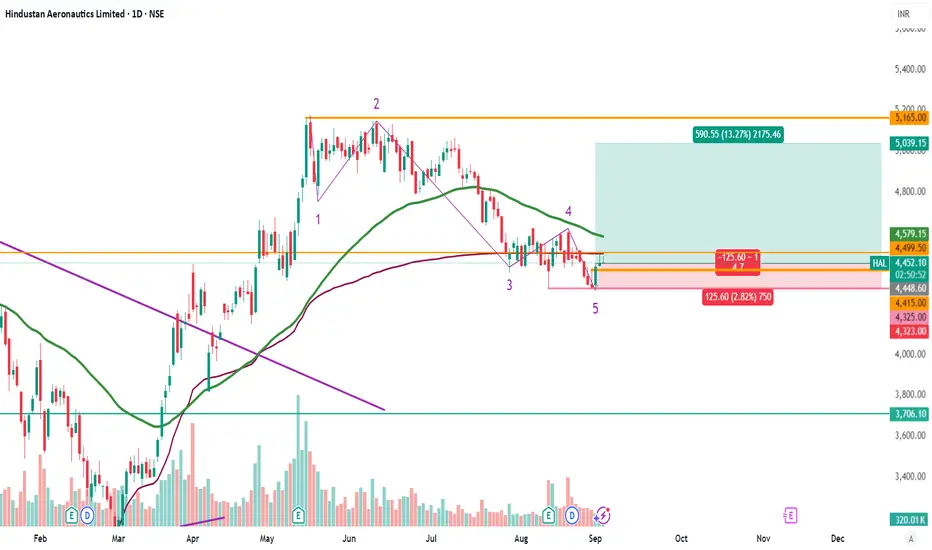
HAL buy HAL has completed the correction..good to buy at 4265 for the target of 5000.. Stop loss 4000 levels. Longby gurub630
HOW TO WATCHLIST ADVANCED VIEW IN TRADINGVIEWHOW TO OPEN ADVANCED VIEW IN TRADINGVIEW **AND WHAT FEATURES IT PROVIDES** ✅ HOW TO OPEN ADVANCED VIEW IN TRADINGVIEW Follow these steps: 1️⃣ Open the Watchlist Panel ➣ On the right side of the Trading-View interface, find the Watchlist panel. ➣ If it is hidden, click the small arrow on the right edge to reveal it. 2️⃣ Find the Layout Icons at the Bottom ➣ At the bottom of the watchlist, you will see multiple icons such as: ➣ List View ➣ Table View ➣ Advanced View (usually an expanded grid-style icon) 3️⃣ Click on “Advanced View” ➣ Click the Advanced View icon. ➣ Your watchlist will switch from the simple list to a more detailed, data-rich layout. ➣ That’s it — Advanced View is now active. ✅ FEATURES OF ADVANCED VIEW IN TRADINGVIEW The Advanced View provides more detailed market information without needing to open charts. Here are the key features: 1️⃣ Multiple Data Columns ➣ You can view several data points directly in the watchlist, such as: ➣ Last Price ➣ Price Change ➣ Change % ➣ Volume ➣ High / Low ➣ Bid / Ask ➣ Time / Session Data ➣ Fundamentals (if applicable) This gives a snapshot of key market info in one place. 2️⃣ Add / Remove Columns You can customize your watchlist: ➣ Click Add Column (+) to insert new data fields ➣ Click the three-dot menu (⋮) → Remove to delete any column 3️⃣ Reorder Columns ➣ Drag and drop column headers ➣ Arrange symbols in the order that works best for you 4️⃣ Sorting by Any Data Click any column header to sort: ➣ One click → ascending ➣ Second click → descending Useful for sorting: ➣ Highest volume ➣ Biggest % movers ➣ Highest price ➣ Top gainers / losers 5️⃣ Expandable Rows (Some advanced layouts allow expanded detail per symbol.) This helps you see: ➣ Additional stats ➣ Extended session data ➣ More fundamentals 6️⃣ Cleaner Multi-Symbol Comparison Advanced View is ideal when watching: ➣ Indices ➣ Futures ➣ Forex pairs ➣ Commodities ➣ Multiple stocks at once It becomes easier to compare signals and market movements. 7️⃣ Switch Back Anytime To return to normal view: ➣ Click the List View icon at the bottom ➣ Watchlist returns to default layout 🎯 Summary ➣ Advanced View gives you a more powerful, professional watchlist layout ➣ Perfect for comparing multiple symbols quickly ➣ Provides more data in a structured table-style format ➣ Fully customizable with columns, sorting & layout toolsEducation02:47by ProTradeMatrix1
HOW TO WATCHLIST TABLE-VIEW VOLUME & EXTENDED HOURSComplete Process: HOW TO WATCHLIST TABLE-VIEW VOLUME & EXTENDED HOURS 1️⃣ Open the Watchlist Panel ➺ The Watchlist panel is located on the right side of the Trading-View interface. ➺ If it is hidden, click the small arrow on the right edge to open it. 2️⃣ Locate the Table-View Tool ➺ At the top of the watchlist panel, you will see three dot icon. ➺ This icon opens the table-view tool inside the watchlist. 3️⃣ Open the Table-View Step-by-step: ➺ Click the table icon at the bottom of the watchlist. ➺ The watchlist will switch from the normal list-view to the table-view layout. 4️⃣ Understanding the Table-View Layout The table-view displays additional columns and organized data in a tabular format. Typical columns include: ⤷ Symbol ⤷ Last Price ⤷ Change (%) ⤷ Volume ⤷ High / Low ⤷ Session Data ⤷ Custom fields (depending on settings) The table-view allows users to compare multiple symbols more clearly. 5️⃣ How to Add Columns in Table-View Step-by-step: ➺ Hover on the column header area. ➺ Click the plus (+) icon or “Add Column” option. ➺ Choose the data you want to add: ⤷ Price ⤷ Change ⤷ Bid / Ask ⤷ Volume ⤷ Open Interest ⤷ Fundamentals (if supported) ⤷ Other available fields The selected column will appear immediately. 6️⃣ How to Remove Columns Step-by-step: ➺ Hover over the column header you want to remove. ➺ Click the three-dot menu (⋮) on that column. ➺ Select “Remove Column”. ➺ The column will be removed from the table. 7️⃣ How to Reorder Columns Step-by-step: ➺ Click and hold the column header. ➺ Drag it left or right. ➺ Release to place it in the new position. This helps personalize the table layout. 8️⃣ Sorting Symbols in Table-View Step-by-step: ➺ Click any column name (for example: Price, Change %, Volume). ➺ Clicking once sorts the column ascending. ➺ Clicking again sorts descending. ➺ A small arrow appears showing the sort direction. 9️⃣ Switch Back to Normal Watchlist View Step-by-step: ➺ Click the same table icon at the bottom again. ➺ The watchlist returns to the default list-view. 🎯 Short Summary (Optional for Captions) ⤷ Open Table-View → Bottom table icon ⤷ Add Columns → Add Column option ⤷ Remove Columns → Three-dot menu → Remove ⤷ Reorder → Drag column headers ⤷ Sort → Click column name ⤷ Return to List → Click table icon againEducation02:36by ProTradeMatrix1
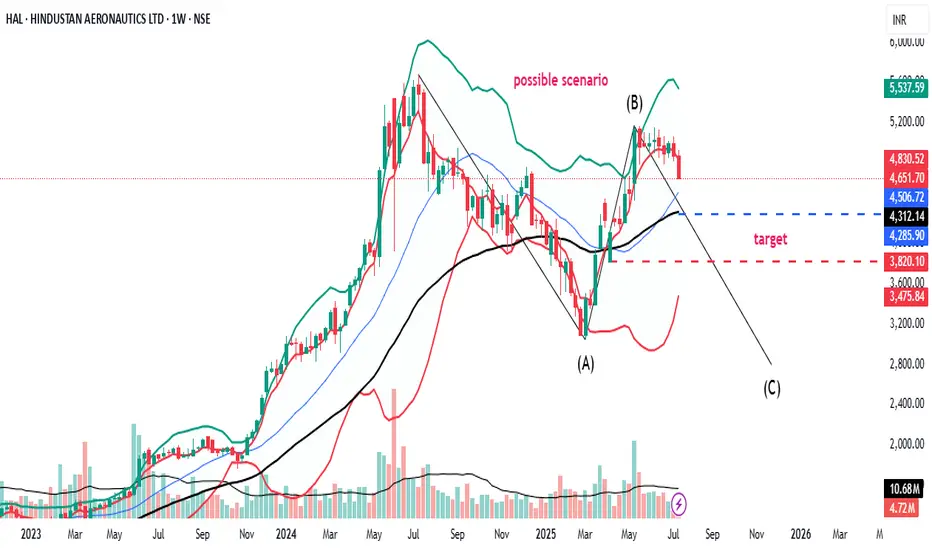
HAL can fall till 1400, plausible fall till 3700.Based on wave analysis and ABC correction and fundamentals view (Tejas crash, hostile environment by adversaries), it can fall till 3700 and if it breaks down then possibly till 1400.Shortby sunilmandhan0
HalHal Chart Analysis ........ 24/11/2025 Short : Below 4590 level Sl : 4630 Target : 4330 / 3500 Enjoy ! Note : The harmonic pattern will be active below the 4300 level, then your target becomes up to the 3500 level.Shortby VirendraPandey2
Review and plan for 24th November 2025 Nifty future and banknifty future analysis and intraday plan. This video is for information/education purpose only. you are 100% responsible for any actions you take by reading/viewing this post. please consult your financial advisor before taking any action. ----Vinaykumar hiremath, CMT Long10:24by vinaysh3
Can it be breakout Stock or Breakdown, Walkthrough on HALThis Video is on HAL which is consolidating for a long time Whether it will give breakout or Breakdown is all explained in Detailed in this video07:28by rajsanwal4
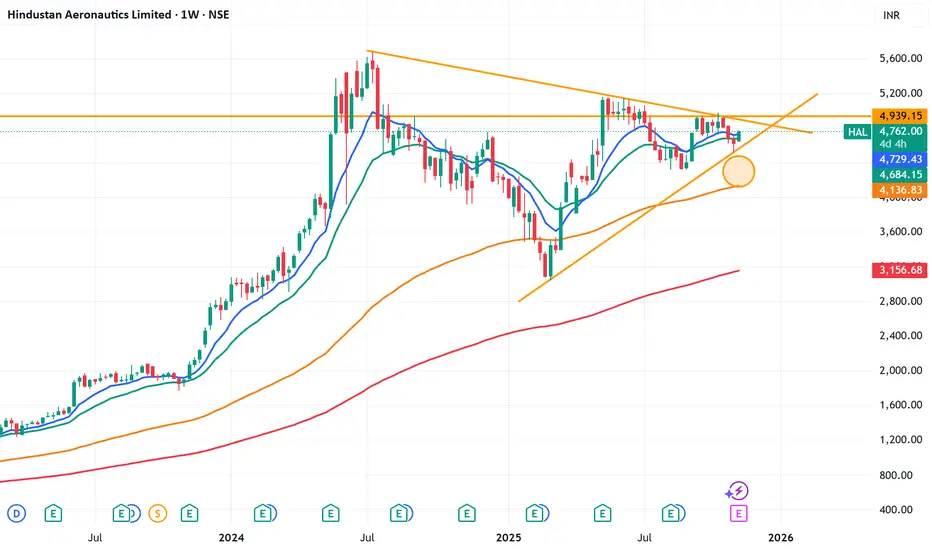
What HAL chart is trying to say?HAL, analyse on weekly TF. I think, it should try to attempt 4930 again. If it consolidates there, expect 5600+ thereafter. Also if it closes below previous day low, and also breaks the lower trend, then a gap would appear and it may try to fill that for 4100 level Disclaimer: This post is just for educational purposeLongby RahulBaid6
HALHi, Price traded at near resistance area so possiblity that it will be moves down side. Let's see what happens This idea is for Educational purpose and paper trading only. Please consult your financial advisor before investing or making any position. Facts or Data given above may be slightly incorrect. We are not SEBI registered Shortby RRC5553
Bullish On HAL Defence Sector₹6.2L Cr budget and 75% indigenization target drive 15% CAGR; order backlog at ₹2L Cr. Sector P/E ~50-60; picks emphasize execution over hype P/E ~39 (undervalued vs. sector 55+), PEG ~2 on 20% growth from Tejas/LCA orders. 26% ROE, 34% ROCE, and ₹94,000 Cr backlog; stable PSU moat. Target: ₹5,500 (13% upside).Longby leowindfall4
Hal BullishThe most important company of defence sector given breakout with heavy volumes at 4hr tfLongby aashujangra6788
A HEALTHY RETRACEMENT IN A BULLISH HALa healthy retracement in a bullish hindustan aerounautics BEARISH CORRECTION WAVE IS COMPLETED BULLISH CANDLE TO TRUST IS FORMED Longby saurabhekhande771
HAL - Target 3839.40 or 6159.20 ?Date: 19-05-2025 #HAL Current Price: 5016.3 Mid-Point: 4999.30 Upside Targets: 5426.46, 5662.10, 5910.65 and 6159.20 Downside Targets: 4572.97,4336.50, 4087.95 and 3839.40 Support: 4809.43 Resistance: 5190.83 #HAL #HALChartAnalysis #HALChartPatterns by Micro_trades123Updated 1114
HAL bearish, Kindly do your own studyHAL is looking bearish on higher time frame. Monthly price action is bearish Monthly MACD is NCO stat Weekly bearish price action. Price has broken last 8 weeks range. Looks like C wave is pending Weekly MACD has given downtick Weekly RSI is below 60 Daily price has challenged lowe bollinger band with good volume Daily MACD is in NCO stat and below zero line Daily RSI is below 40 Daily ADX is strong Longby VR_Securities2216
HAL: fake breakdown and a possible bullish move.Stock: Hindustan Aeronautics Ltd NSE:HAL • Timeframe: 1-day candles (each candle represents one day of trading) 1. Consolidation Zone: A grey rectangular box highlights an area of "consolidation" starting from around May 14th. This means the stock price has been trading sideways within a relatively narrow range, not showing a clear uptrend or downtrend. 2. Fake Breakdown: An arrow points to a price dip below the lower boundary of the consolidation zone. The annotation calls this a "fake breakdown." This implies that the price temporarily moved below the support level, but then quickly bounced back up. 3. Potential Trade Setup: The chart suggests a potential long (buy) trade based on the fake breakdown and the subsequent recovery. • Entry Point: Around 4,897.55 (labeled "ENTRY" on the chart) which is the price at which the stock could be bought. • Stop Loss: Around 4,733.75 (likely intended to be the "4733.60") This is the level below which the trader would exit the position to limit potential losses if the price moves against them. • Targets: The chart identifies three potential profit targets: * Target 1: 5,087.85 * Target 2: 5,305.15 * Target 3: 5,497.80Longby thetradeforecastUpdated 6
HAL - no wonder it is forming a FlagThe usual suspect among Defence Names in the country. Keep an eye outLongby bharatbullsUpdated 4
accumulation phase if breakout will create new 52highConsolidation above 9ema and already bounched from 26ema Longby Jindalksreddycsc1
HALGood results, sharp trend reversal, crossed crucial resistance, carrying potential to reach ATH.Longby vatsal_mehta_1
tejas is ready to fly highcan look for a short oppurtunity in this. chart looks good sector is good and rising Longby Nishpaul0614
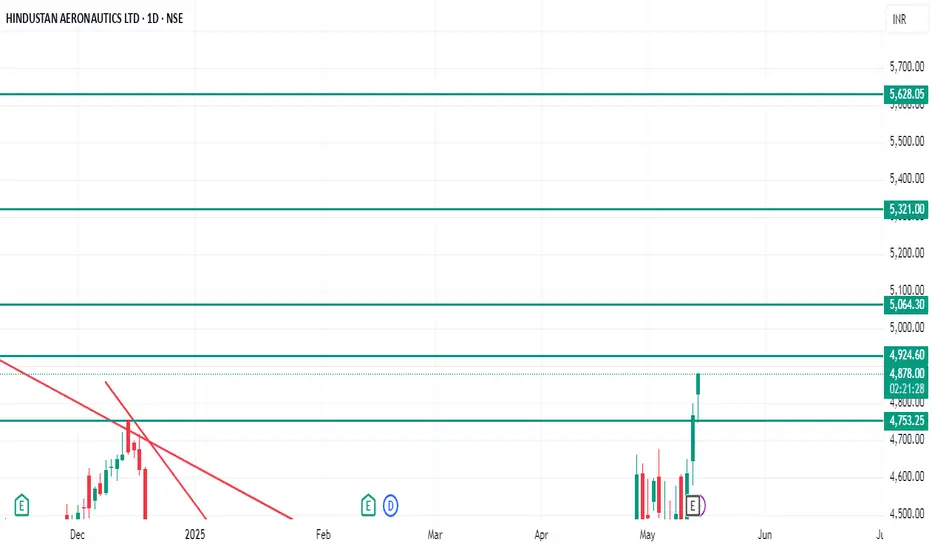
Go long in HALIt's a very good breakout in Hindustan aeronautics Ltd. 4755 was an important resistance in HAL on daily frame basis. Now it's breakout of this level. From here (CMP - 4877) we can expect upside targets in HAL: 4925,5065, 5320 & 5620. Stoploss against this investment can be placed near 4740.Longby Wealthy_tradesUpdated 2
HAL -Hindustan Aeronautics Ltd. (45 minutes chart, NSE) - LongHAL -Hindustan Aeronautics Ltd. (45 minutes chart, NSE) - Long Position; short-term research idea. Risk assessment: High {volatility risk} Risk/Reward ratio ~ 2.05 Current Market Price (CMP) ~ 4740 Entry limit ~ 4665 on May 14, 2025 1. Target limit ~ 4780 (+2.47%; +115 points) 2. Target limit ~ 4880 (+4.61%; +215 points) Stop order limit ~ 4560 (-2.25%; -105 points) Disclaimer: Investments in securities markets are subject to market risks. All information presented in this group is strictly for reference and personal study purposes only and is not a recommendation and/or a solicitation to act upon under any interpretation of the letter. LEGEND: {curly brackets} = observation notes = important updates (parentheses) = information details ~ tilde/approximation = variable value -hyphen = fixed valueLongby VEDIMarketWatchUpdated 1
Hindustan aeronautics Here is the English version, ready to copy: --- This chart is of Hindustan Aeronautics Ltd (HAL). It shows a technical pattern known as the "Cup and Handle" pattern. The chart shows a resistance zone around 4600–4700, which the stock has recently tested. If the breakout is successful, an upward rally can be expected. If you find this helpful and want more FREE forecasts in TradingView, Hit the 'BOOST' button Drop some feedback in the comments below! (e.g., What did you find most useful? How can we improve?) Your support is appreciated! Now, it's your turn! Be sure to leave a comment; let us know how you see this opportunity and forecast. Have a successful week DISCLAIMER: I am NOT a SEBI registered advisor or a financial adviser. All the views are for educational purpose only by milanpatel0078